Square POS Integration
Add AI SMS Marketing to Square in Under 5 Minutes
Connect ReturnFlowHQ to your Square POS and immediately turn your customer purchase data into personalized SMS campaigns that drive repeat visits.
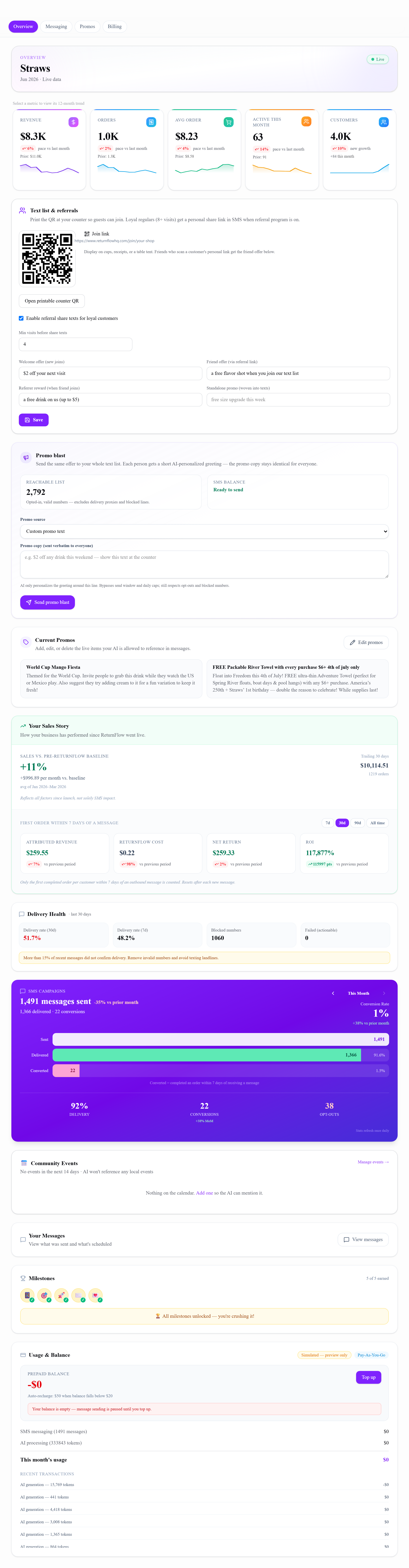
After Square sync
Your Square data becomes a live owner dashboard
Customer history, order trends, and SMS delivery health show up automatically once Square is connected — no manual CSV uploads or separate BI tool.
How it works
01
Connect your Square account
Click Connect Square and authorize ReturnFlowHQ. No API keys or technical setup — just OAuth in under 60 seconds.
02
Customers and history import automatically
ReturnFlowHQ pulls your full customer list and order history from Square. First sync typically completes within minutes.
03
AI builds your first campaign
After carrier registration (usually 1–3 days), the AI segments your customers and drafts personalized messages using real purchase data. Review and approve, or let it run automatically.
04
Watch revenue attribution roll in
Every purchase within 7 days of a message is tracked and credited. See exactly which campaigns move the needle.
Frequently asked questions
How does ReturnFlowHQ integrate with Square POS?
ReturnFlowHQ connects to your Square account via OAuth. Once authorized, it automatically imports your customer list, order history, and real-time transactions. Setup takes under five minutes.
Does ReturnFlowHQ work with Square for Restaurants?
Yes. It works with Square for Restaurants, Square Point of Sale, and Square for Retail. Any business using Square to process payments can connect in minutes.
What Square data does ReturnFlowHQ use for SMS campaigns?
Customer purchase history, order frequency, average order value, last visit date, and product/category preferences — all pulled automatically from Square.
Can I use ReturnFlowHQ with multiple Square accounts?
Yes. Franchise operators can connect each Square location separately and manage them from one admin dashboard with per-location reporting and independent customer lists.
Connect Square — we file carrier registration
Everything you need to turn Square customers into repeat visitors — in one platform.
Connect Square — $5 send creditExplore Square SMS marketing
Industries, guides, and product pages — all built for operators on Square POS.